Skip to content
PROWERB
Services
Industries
Cases
Lab & Software
Company
DENeeds Check →
Services
Industries
Cases
Lab & Software
Company
LanguageDEEN
Start Needs Check →
PROWERB — Elevating Brands

Marketing Operations Backbone since 1979. Promotional products, logistics, kitting and digital commerce. One partner with its own operations in Kleve.

Elevating Brands — since 1979.Kleve · Düsseldorf · Dortmund · Lüdinghausen
Services
Logistics & fulfillmentPromotional products & merchandiseDigital commerce & marketplaceEvents & campaignsKitting, textile & ESGTech & AI
Company
About usLocationsHow we workSustainabilityCareersContactInternationalPress & news
Resources
GuidesInsights archiveGlossaryDownloadsTools & calculatorsCosts & calculationCompare operating models
Contact
PROWERB, Huissener Str. 7–947533 Kleve+49 (0)2821 7218-0info@prowerb.de
© 1979–2026 Prowerb GmbHLegal notice (German)Privacy policy (German)Terms (German)BrandDEEN

All rights reserved. Subject to change. Text and images on this website have in part been created or edited using artificial intelligence.

Client portal · Access for clients

You don't need to call us to know where your goods are.

Already a client? Find access →Discover the portal →Use your existing welcome or project link. If it is missing, the responsible team can help.

The client portal brings together the stock, order, shipment and budget information agreed for your project. Warehouse bookings, carrier updates and reports follow their respective update schedules; scope, roles and cadence are agreed during setup. Existing clients use their welcome or project link. If it is missing, choose “Portal access”; prospective clients can request a separate demo.

Thesis

See stock, orders and open cases together.

The customer portal provides the information agreed for your operation from PROWERB Core and connected data sources. Warehouse transactions, carrier updates and reports may have different refresh times. During setup, we agree which views your team needs, how data is updated and where enquiries go. This lets an order be followed from stock through to shipping status.
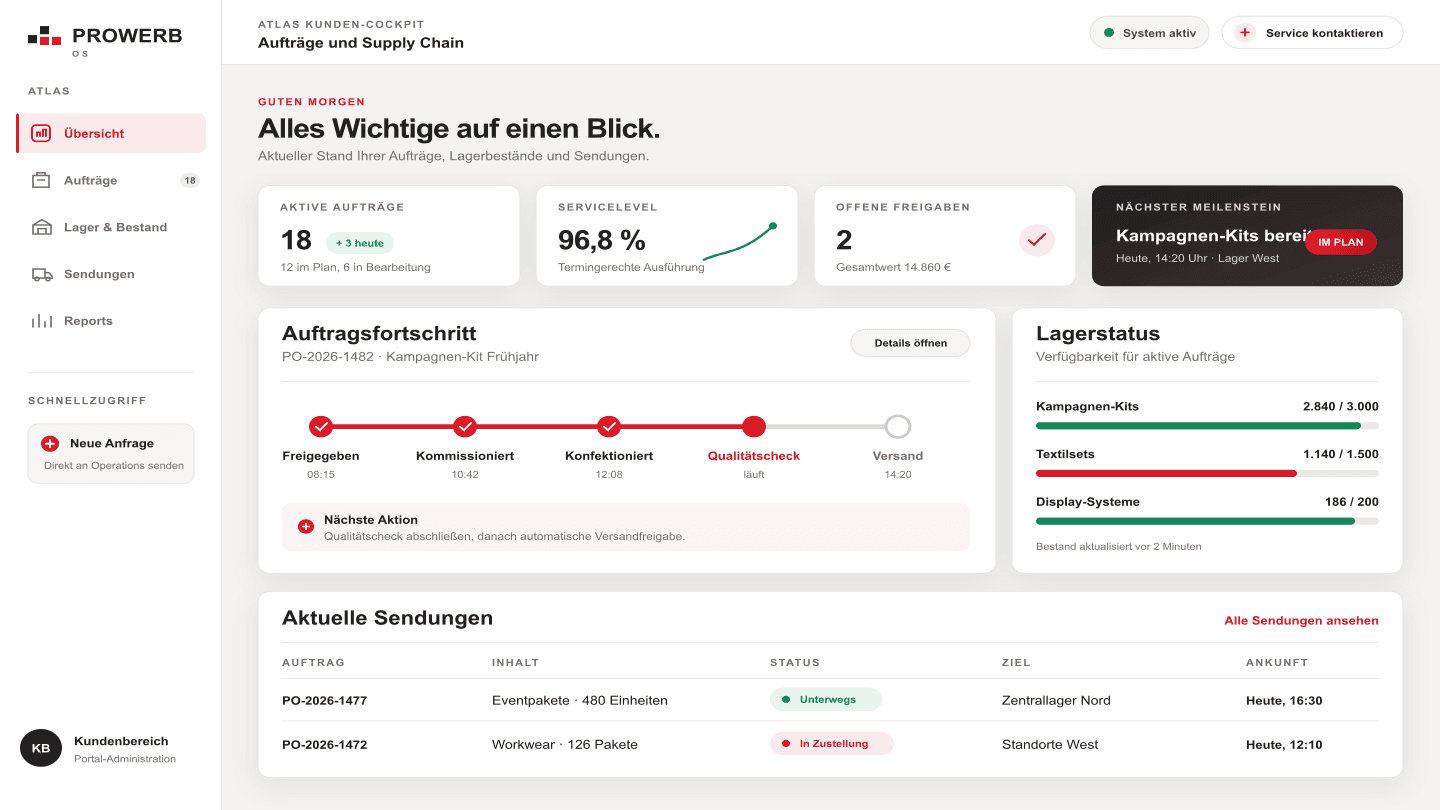
Portal overview with orders, stock and shipment status (German interface).
Example view. Views and permissions are configured for each client. Open full view (new tab) ↗
Inside the portal

What you see when you log in.

The portal brings together the agreed Operations Cockpit data services. The views on this page illustrate portal tasks. Your access, available reports and permissions are configured for your organisation. Existing customers use their personal welcome or project link.

01Inventory trendsInventory data from PROWERB Core with the agreed views for receiving, picking, transfers and stocktakes. The current data timestamp is considered when interpreting the figures.
02Track & traceCarrier updates and shipment tracking help assign enquiries to the correct shipment. Recipient notifications and the process for exceptions are agreed during setup.
03Live reportsPower BI reports live instead of weekly reports, automated Excel extracts for the department, ad-hoc notifications when things need to move fast. Available 24/7.
04Budget controlCampaign and promotional-products budgets in view while the campaign runs — not just in the after-the-fact reconciliation.
05Campaign management via the MEPAnyone running campaigns manages them through the Marketing Execution Platform: promotion planning, campaign configurator, shipment-list upload. 18 customizable modules, cloud-based, connectable to your online shops, ERP and WMS systems.
06Integration with your systemsThe cockpit can be embedded into client systems — the data flows to where your team already works.
FAQ

Frequently asked questions about the client portal.

How current is the data in the portal?

That depends on the data source. Warehouse transactions, carrier updates and BI reports are refreshed through different processes. We agree data scope and refresh requirements at setup; the relevant timestamp matters during operations. A real-time warehouse transaction does not automatically mean an external carrier update is already available.

What exactly do I see when I log in?

Inventory trends, track & trace through to the recipient, Power BI live reports with automated Excel extracts for the department, and budget control while the campaign runs. Anyone running campaigns also manages them via the MEP with promotion planning, campaign configurator and shipment-list upload — all available around the clock.

Can the portal be connected to our own systems?

Yes. The Operations Cockpit can be embedded into client systems — the data flows to where your team already works. The cloud-based MEP with its 18 customizable modules connects to your online shops, ERP and WMS systems.

Does this also work for large accounts in continuous operation?

Cross-brand reporting is provided for Coca-Cola in ongoing operations. For your project, the agreed views, access rights and update paths determine the scope.

Do I spot problems before they reach the recipient?

Shipping status and open cases can indicate exceptions. Whether an issue can be identified depends on the available updates. We agree which notifications your team receives and how investigations, responses or replacement decisions are handled.

How can I see the portal before placing an order?

Arrange a meeting through the demo route. We will show the views relevant to your requirements and discuss the information and access rights your team needs. For help with an existing account, use the separate portal-access route.

How do I find access as an existing client?

Open your existing welcome or project link. If it is no longer available, choose Portal access: the responsible team will help with the right access route. A portal demo is separate from this.

Related topics

These pages fit too.

  • 01Prowerb OS customer portal
  • 02Reporting & Dashboards
  • 03Contact
Access

Find access or discover the portal.

Existing clients use their personal welcome or project link or ask the responsible team for help. Interested visitors follow the separate demo route through the portal with anonymized data from live operations.

Discover the portal →Your contact replies within 24 hours on business days.